Login with Hive Keychain
Enter your Hive username to sign in securely.
Welcome to HiveComb
HiveComb runs on Hive — an open, decentralized blockchain where your posts, votes, and communities belong to you, not a company. To get started, follow these steps:
Create a Hive account
Set up your free account — it only takes a minute.
Install Hive Keychain
A browser extension that securely signs your transactions — your keys never leave your device.
Refresh & log in
Once Keychain is installed, refresh this page and click Login again.
Need help? Join our Discord and we'll help you get set up.
No account? Create one
Having trouble creating your account? Come to our Discord and we'll get you set up.














































No posts found
Try adjusting your filters or wait for the worker to classify more posts.
 @collinz
· Feb 5 01:59 AM
@collinz
· Feb 5 01:59 AM
 @mrpointp
· Feb 5 01:58 AM
@mrpointp
· Feb 5 01:58 AM
 @deeanndmathews
· Feb 5 01:58 AM
@deeanndmathews
· Feb 5 01:58 AM
 @bluedevil0722
· Feb 5 01:57 AM
@bluedevil0722
· Feb 5 01:57 AM
 @esthefanychacin
· Feb 5 01:57 AM
@esthefanychacin
· Feb 5 01:57 AM
 @acactus1013
· Feb 5 01:57 AM
@acactus1013
· Feb 5 01:57 AM
 @ataliba
· Feb 5 01:56 AM
@ataliba
· Feb 5 01:56 AM
 @roger5120
· Feb 5 01:55 AM
@roger5120
· Feb 5 01:55 AM
 @lesmann
· Feb 5 01:55 AM
@lesmann
· Feb 5 01:55 AM
 @jhymi
· Feb 5 01:54 AM
@jhymi
· Feb 5 01:54 AM
 @drawmeaship
· Feb 5 01:54 AM
@drawmeaship
· Feb 5 01:54 AM
 @prydefoltz
· Feb 5 01:53 AM
@prydefoltz
· Feb 5 01:53 AM
 @jimmy.adames
· Feb 5 01:53 AM
@jimmy.adames
· Feb 5 01:53 AM
 @ftcinetv
· Feb 5 01:53 AM
@ftcinetv
· Feb 5 01:53 AM
 @littledisciples
· Feb 5 01:51 AM
@littledisciples
· Feb 5 01:51 AM
 @ultm8x
· Feb 5 01:50 AM
@ultm8x
· Feb 5 01:50 AM
 @ydaiznfts2
· Feb 5 01:49 AM
@ydaiznfts2
· Feb 5 01:49 AM
 @leidimarc
· Feb 5 01:49 AM
@leidimarc
· Feb 5 01:49 AM
 @paulriq
· Feb 5 01:48 AM
@paulriq
· Feb 5 01:48 AM
 @justinpencilz
· Feb 5 01:48 AM
@justinpencilz
· Feb 5 01:48 AM
 @alphalab
· Feb 5 01:47 AM
@alphalab
· Feb 5 01:47 AM
 @galenkp
· Feb 5 01:47 AM
@galenkp
· Feb 5 01:47 AM
 @morito13
· Feb 5 01:47 AM
@morito13
· Feb 5 01:47 AM
 @chonodeya
· Feb 5 01:47 AM
@chonodeya
· Feb 5 01:47 AM
 @lolysacc
· Feb 5 01:46 AM
@lolysacc
· Feb 5 01:46 AM
 @deihive
· Feb 5 01:46 AM
@deihive
· Feb 5 01:46 AM
 @kawsar8035
· Feb 5 01:46 AM
@kawsar8035
· Feb 5 01:46 AM
 @bigtakosensei
· Feb 5 01:46 AM
@bigtakosensei
· Feb 5 01:46 AM
 @andr3apat1no
· Feb 5 01:46 AM
@andr3apat1no
· Feb 5 01:46 AM
 @tdvtv
· Feb 5 01:44 AM
@tdvtv
· Feb 5 01:44 AM
 @therealskin-lol
· Feb 5 01:44 AM
@therealskin-lol
· Feb 5 01:44 AM
 @kstreet
· Feb 5 01:43 AM
@kstreet
· Feb 5 01:43 AM
 @fcasanova
· Feb 5 01:41 AM
@fcasanova
· Feb 5 01:41 AM
 @pannyy
· Feb 5 01:41 AM
@pannyy
· Feb 5 01:41 AM
 @falopey
· Feb 5 01:40 AM
@falopey
· Feb 5 01:40 AM
 @josman831
· Feb 5 01:40 AM
@josman831
· Feb 5 01:40 AM
 @almightygrim
· Feb 5 01:39 AM
@almightygrim
· Feb 5 01:39 AM
 @yanisdemon
· Feb 5 01:38 AM
@yanisdemon
· Feb 5 01:38 AM
 @greatness96
· Feb 5 01:38 AM
@greatness96
· Feb 5 01:38 AM
 @jasonmunapasee
· Feb 5 01:38 AM
@jasonmunapasee
· Feb 5 01:38 AM
 @gr33nm4ster
· Feb 5 01:38 AM
@gr33nm4ster
· Feb 5 01:38 AM
 @deepspiral
· Feb 5 01:37 AM
@deepspiral
· Feb 5 01:37 AM
 @mamaemigrante
· Feb 5 01:36 AM
@mamaemigrante
· Feb 5 01:36 AM
 @doitvoluntarily
· Feb 5 01:35 AM
@doitvoluntarily
· Feb 5 01:35 AM
 @vicnzia
· Feb 5 01:35 AM
@vicnzia
· Feb 5 01:35 AM
 @taskmaster4450le
· Feb 5 01:35 AM
@taskmaster4450le
· Feb 5 01:35 AM
 @kaibagt
· Feb 5 01:34 AM
@kaibagt
· Feb 5 01:34 AM
 @eii
· Feb 5 01:34 AM
@eii
· Feb 5 01:34 AM
 @cmplxty
· Feb 5 01:31 AM
@cmplxty
· Feb 5 01:31 AM
 @cruis
· Feb 5 01:31 AM
@cruis
· Feb 5 01:31 AM
 @leanpoqui
· Feb 5 01:31 AM
@leanpoqui
· Feb 5 01:31 AM
 @xabi
· Feb 5 01:30 AM
@xabi
· Feb 5 01:30 AM
 @wiljman76
· Feb 5 01:30 AM
@wiljman76
· Feb 5 01:30 AM
 @lupafilotaxia
· Feb 5 01:29 AM
@lupafilotaxia
· Feb 5 01:29 AM
 @crypto-zard
· Feb 5 01:28 AM
@crypto-zard
· Feb 5 01:28 AM
 @cotton88
· Feb 5 01:28 AM
@cotton88
· Feb 5 01:28 AM
 @luisgtt
· Feb 5 01:27 AM
@luisgtt
· Feb 5 01:27 AM
 @josuerr29
· Feb 5 01:26 AM
@josuerr29
· Feb 5 01:26 AM
 @linarev
· Feb 5 01:26 AM
@linarev
· Feb 5 01:26 AM
 @anacarolina2022
· Feb 5 01:26 AM
@anacarolina2022
· Feb 5 01:26 AM
No posts found
Try adjusting your filters or wait for the worker to classify more posts.
@collinz
· Feb 5 01:59 AM
OCDarthive
@mrpointp
· Feb 5 01:58 AM
HIVE CN 中文社区travelfood
@deeanndmathews
· Feb 5 01:58 AM
Freewritersentrepreneurship
@bluedevil0722
· Feb 5 01:57 AM
Splinterlandsgaming
@esthefanychacin
· Feb 5 01:57 AM
Liketufood
@acactus1013
· Feb 5 01:57 AM
HIVE CN 中文社区food
@ataliba
· Feb 5 01:56 AM
Actifithealth-fitness
@roger5120
· Feb 5 01:55 AM
Actifithealth-fitness
@lesmann
· Feb 5 01:55 AM
Alien Art Hiveart
@jhymi
· Feb 5 01:54 AM
The Ink Wellwriting
@drawmeaship
· Feb 5 01:54 AM
Sketchbookart
@prydefoltz
· Feb 5 01:53 AM
spirituality
@jimmy.adames
· Feb 5 01:53 AM
Actifithealth-fitnessoutdoor-sports
@ftcinetv
· Feb 5 01:53 AM
Actifithealth-fitness
@littledisciples
· Feb 5 01:51 AM
diy-craftstravel
@ultm8x
· Feb 5 01:50 AM
gaming
@ydaiznfts2
· Feb 5 01:49 AM
Splinterlandsgaming
@leidimarc
· Feb 5 01:49 AM
Weekend Experienceswritingsocial-issues
@paulriq
· Feb 5 01:48 AM
LeoFinancecontests
@justinpencilz
· Feb 5 01:48 AM
OCDart
@alphalab
· Feb 5 01:47 AM
ai
@galenkp
· Feb 5 01:47 AM
Self Improvementphilosophy
@morito13
· Feb 5 01:47 AM
WorkLifewritingtravel
@chonodeya
· Feb 5 01:47 AM
HIVE CN 中文社区travel
@lolysacc
· Feb 5 01:46 AM
Hive Petspets
@deihive
· Feb 5 01:46 AM
Family & Friendswriting
@kawsar8035
· Feb 5 01:46 AM
Photography Loversnature
@bigtakosensei
· Feb 5 01:46 AM
cryptohive
@andr3apat1no
· Feb 5 01:46 AM
Movies & TV Showsmovies-tv
@tdvtv
· Feb 5 01:44 AM
crypto
@therealskin-lol
· Feb 5 01:44 AM
League of Legendsvideogaming
@kstreet
· Feb 5 01:43 AM
Threespeakgaming
@fcasanova
· Feb 5 01:41 AM
Sketchbookwritingdiy-crafts
@pannyy
· Feb 5 01:41 AM
Weekend Experiencesspirituality
@falopey
· Feb 5 01:40 AM
LeoFinancecryptoart
@josman831
· Feb 5 01:40 AM
Cryptobrewmastercontests
@almightygrim
· Feb 5 01:39 AM
THGamingcontests
@yanisdemon
· Feb 5 01:38 AM
Rising Star Gamegaming
@greatness96
· Feb 5 01:38 AM
HeartChurchspirituality
@jasonmunapasee
· Feb 5 01:38 AM
Orchid Loversnature
@gr33nm4ster
· Feb 5 01:38 AM
Hive Gamingwritinggaming
@deepspiral
· Feb 5 01:37 AM
LeoFinanceentrepreneurshipspirituality
@mamaemigrante
· Feb 5 01:36 AM
Liketuwritingtravel
@doitvoluntarily
· Feb 5 01:35 AM
finance
@vicnzia
· Feb 5 01:35 AM
Cervanteswritingphilosophy
@taskmaster4450le
· Feb 5 01:35 AM
LeoFinancefinance
@kaibagt
· Feb 5 01:34 AM
Foodies Bee Hivefood
@eii
· Feb 5 01:34 AM
photography
@cmplxty
· Feb 5 01:31 AM
WE ARE MOVINGnature
@cruis
· Feb 5 01:31 AM
Splinterlandsgaming
@leanpoqui
· Feb 5 01:31 AM
Emotions & Feelingswriting
@xabi
· Feb 5 01:30 AM
Splinterlandsgaming
@wiljman76
· Feb 5 01:30 AM
DTubevideogaming
@lupafilotaxia
· Feb 5 01:29 AM
finance
@crypto-zard
· Feb 5 01:28 AM
WOOGamecombat-sports
@cotton88
· Feb 5 01:28 AM
ai
@luisgtt
· Feb 5 01:27 AM
Actifittravel
@josuerr29
· Feb 5 01:26 AM
Hive Open Micwritingdiy-crafts
@linarev
· Feb 5 01:26 AM
Movies & TV Showshistorymovies-tv
@anacarolina2022
· Feb 5 01:26 AM
Jewelrydiy-crafts
No posts found
Try adjusting your filters or wait for the worker to classify more posts.
Welcome to HiveComb!
Choose your default filters to see the content you care about most.
Languages
Categories
Sentiment
My Hive Business Card Design

Hi everyone, I hope you're having a great day. I decided to put my creative skills to the test by entering the business card design contest. I was inspired by the designs I saw and wanted to try something new on Hive.
I have a strong passion for anything that promotes Hive and believe that this is one of the best ways to expose Hive to others. Using my phone and Canva, I created a simple design. Below is the design process:

The frontside Design Process
For those who are well-versed with Canva, it's easy to utilize templates for designing purposes.
But I decided to start from scratch and selected a plain business card template.

I located a circle in the elements section and altered its color to red.

Then, I made a copy of the circle and changed its color to black, but had to match the red colours to the Hive logo colour. I positioned these two circles in the corner of the rectangle shape, with the black circle overlapping the red and dominating it.

Later, I incorporated the Hive logo that I had previously obtained from a free-to-use design by @doze. The logo was positioned on the white space on the right side.

To add a creative touch, I utilized the free elements on Canva and found a world map. The world map represents my desire for Hive to achieve widespread adoption.

The subsequent step was to include some information on the business card. I included details that could help someone quickly understand Hive, specifically information about the Hive blockchain.

I added the first QR code that I created using ME-QR. By scanning the code, anyone can be directed to Hiveonboard.com to sign up. This was placed under the Hive logo. Additionally, I included the Hive website where anyone can log in and learn more about Hive.

I finally had a nice design for the front side and moved on to the back side.
The Backside Design Process
The back side was a simple design I created. I placed the second QR code, which leads to the Hive Philippines community on Discord, at the center of the rectangle. I retouched the QR code by changing the three round circles to red.


I copied the two circles from the front side and pasted them on the shape.

I duplicated each circle, resulting in four circles, two red and two black. Similar to the front side, I positioned the circles in the corners of the rectangle, one in the top left corner and the other two in the bottom right corner.

As the business card design contest is a test run for the @hiveph community (Philippines), I attempted to use a symbol representing the country or community logo. I found a round Philippines flag on Canva. I aimed to create a unique design by positioning the logo between Hive and Philippines.
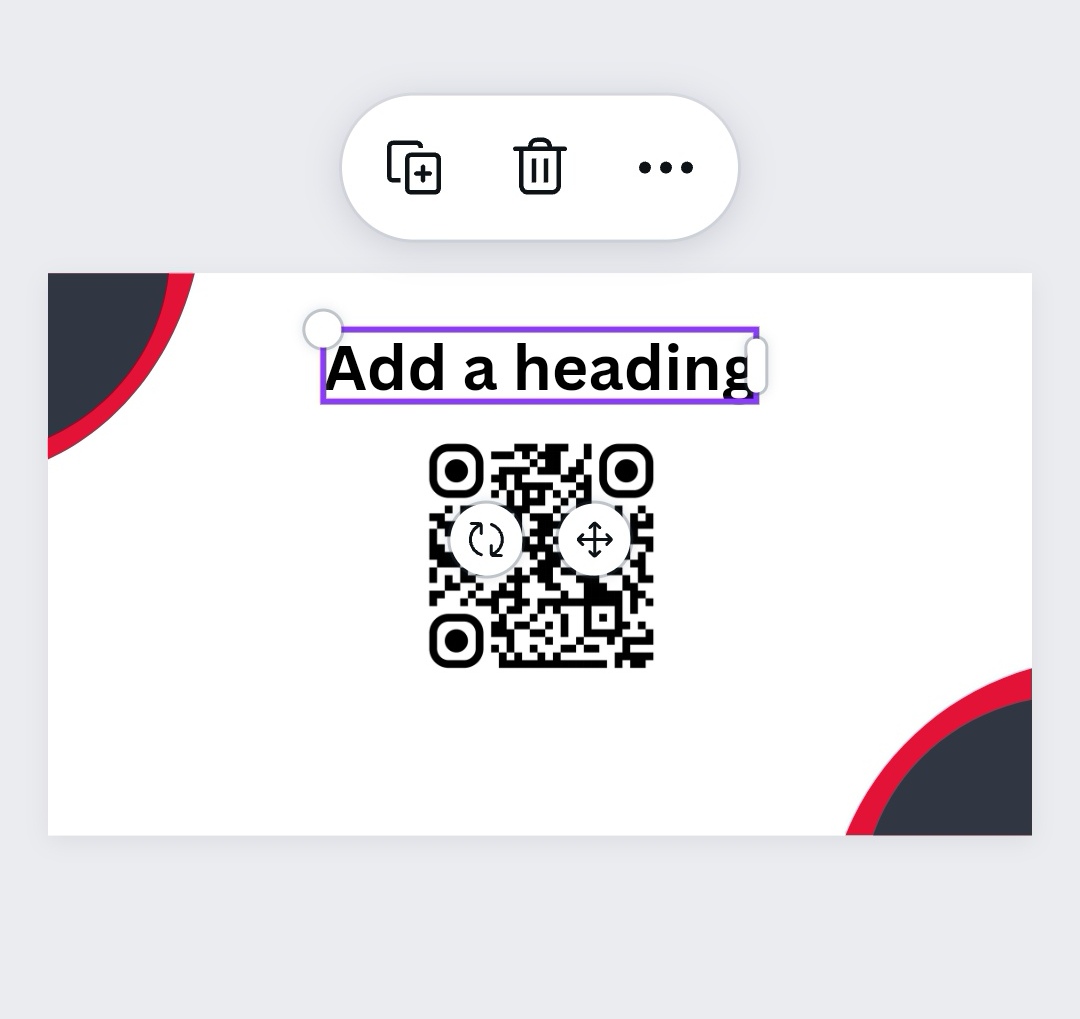


And Voilà! I created two fantastic designs using just Canva.

It was a fantastic opportunity for me to try something new this week, and I am grateful to @acidyo for the chance
Report Misclassification
Why is this post incorrectly classified?
Comments
5 commentsCongrats you able to design that business card. You are skillful.It's not easy to design a card using the computer.
Thank you for your kind words! I'm glad you appreciate the effort put into designing the business card. Designing using a computer or phone can be challenging at times, but it's rewarding to see the final result. I don't know if you have made submission, if not then give it a try @dehai
Really nice buisness card
Thank you
You're welcome